An HP-specific BIOS handler lets an attacker who already controls the operating-system kernel write into protected firmware memory. CERT/CC’s October 1 vulnerability note describes the unsafe memory operation in InsydeH2O firmware used by HP PCs. The attacker needs local kernel-level privilege, but the possible destination is System Management RAM, or SMRAM, where ordinary kernel code should have no write access.
If a compromised kernel reaches this handler, altering SMM code or data could change later firmware execution and potentially give the attacker code execution in System Management Mode. CERT/CC also describes possible persistence through SMRAM modification. This is a post-compromise escalation path for an attacker with kernel access.
Kernel input reaches the SMM handler
The affected component is HP’s custom H19WMIHandlerSmm module, identified by GUID f1946499-571b-44c3-9b9c-cc55210b0c02. CERT/CC says a kernel-level attacker can raise a software System Management Interrupt through I/O port 0xB2 and supply CPU register values that the handler fails to validate adequately. Its subsequent memory operation can reach arbitrary physical addresses, including SMRAM. The note assigns the issue CVE-2026-12855 and credits independent firmware researcher Zhenyu Liu.
SMM runs separately from the operating system. That separation normally protects firmware services from kernel code; here the vulnerable HP handler takes a request from that less-protected side and performs the write while running in SMM. A request from the OS kernel crosses into the SMM handler; the second arrow reaches SMRAM, the protected destination.
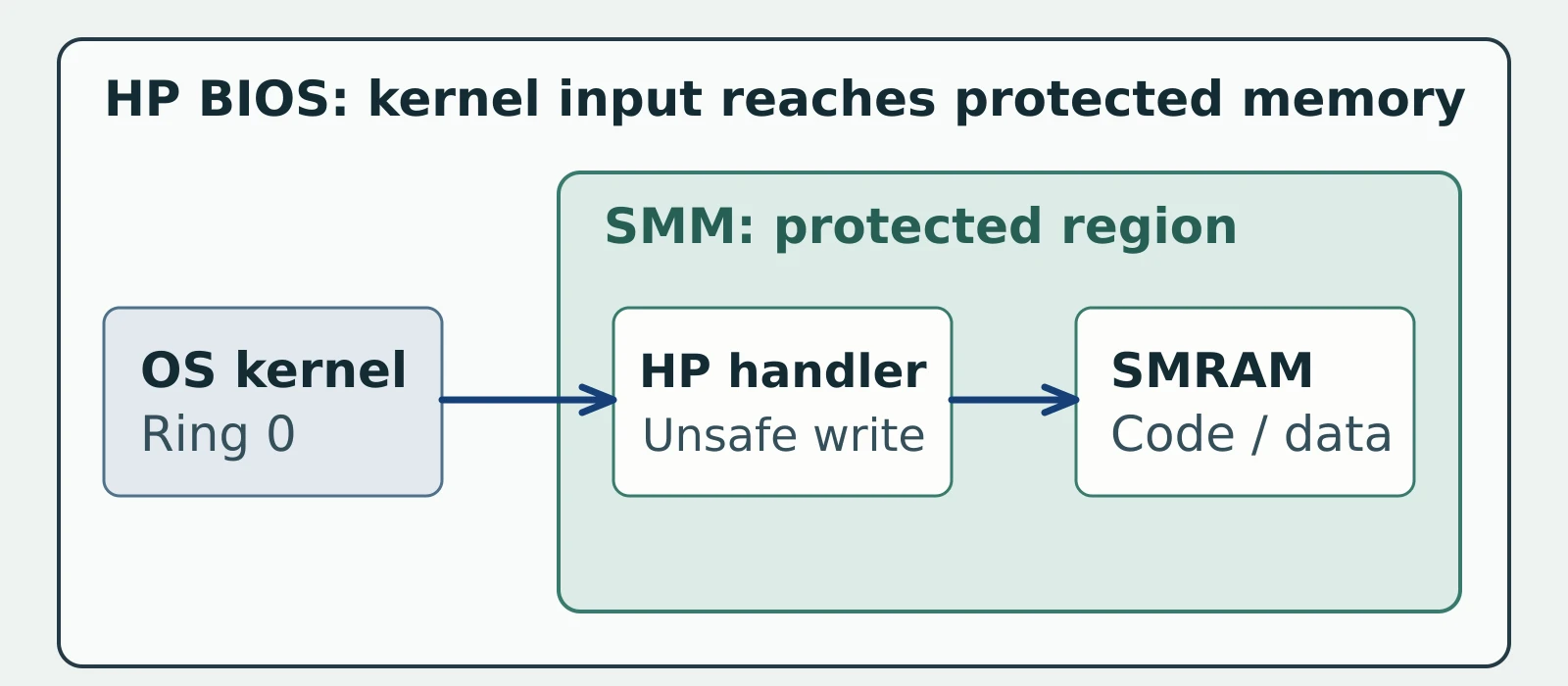
Figure details
The outer frame is the HP PC firmware context. An OS-kernel node outside the nested SMM region points to the HP SMM handler inside that region. The handler points to SMRAM, also inside SMM. The first arrow marks the request crossing into SMM; the second marks the physical-memory write reaching the protected memory region. An attacker needs local kernel-level access before this path is available.
HP-specific code narrows the search
Insyde’s advisory says, “The vulnerability exists in the code developed specifically for HP projects.” In its statement to CERT/CC, Insyde says these OEM-specific modules are absent from its standard code for downstream developers. AMI, ASUS and GIGABYTE each reported their products unaffected in the CERT/CC note. Start with HP hardware and its installed BIOS, rather than treating every InsydeH2O machine as affected.
The CVE Program record rates the local, high-privilege issue 8.2 under CVSS 3.1; CISA’s enrichment lists exploitation as “none” as of its September 9 assessment. CERT/CC calls the ability to affect firmware or ROM contents “platform-dependent”; prioritize the described SMRAM exposure while checking HP’s model-specific remediation.
Match HP updates to actual PCs
Inventory HP PC models, system-board identifiers and installed BIOS versions through the fleet management data you already collect. HP’s security bulletins are CERT/CC’s recommended place to determine which system-specific BIOS release applies. For an affected model with a fixed release listed by HP, deploy that OEM BIOS update through the normal firmware-update channel. Confirm the installed BIOS version after reboot, including on devices that missed the update window.
Insyde lists corrected HP feature versions by platform: 05.47.2701.2631 for 5.4, 05.55.45.2630 for 5.5, 05.62.29.2630 for 5.6, 05.72.21.2630 for 5.7 and 06.01.23.2630 for 6.0. Those are supplier feature versions, so use HP’s system-specific BIOS bulletin to select the installable release rather than comparing a PC’s BIOS version string directly with Insyde’s numbers. CERT/CC lists HP Inc.’s response as unknown. If HP has not listed an applicable fixed BIOS for a model, send its model and installed version to HP support and leave the device in the remediation queue.
Confirm the firmware after reboot
Check each HP PC’s model, system-board ID and installed BIOS version against HP’s security bulletin for that model. Where HP lists a fixed OEM BIOS release for an affected model, install it. Restrict local administrator privileges and kernel-driver installation on those machines while scheduling updates; the published attack starts with kernel privilege.
Verify the installed BIOS version after reboot against the fixed HP release for that specific model. The expected result is a match; keep older builds in the update queue even when an updater reported success. Investigate suspected kernel compromise as an incident alongside the firmware update.