
Seven LiteLLM 1.107.0 wheels published to PyPI on October 21 carried a credential stealer and an hourly remote-code loader, according to StepSecurity’s inspection. The same files reached official Docker images. A developer, CI runner or AI proxy that started Python in one of those environments could run the malware without importing LiteLLM.
The stealer sought browser passwords, SSH and cloud credentials, AI coding-tool tokens, process environments and keys stored by the LiteLLM proxy. The risk reaches past the affected Python environment: a proxy with DATABASE_URL set could expose its stored provider credentials, while a CI runner could expose secrets from other readable process environments. StepSecurity says the malicious release and infected images have been removed; a previously pulled wheel or image still needs investigation.
A Clean Tag, Different Build
StepSecurity compared the published source distribution, seven wheels and container provenance with the project’s release tag. “The v1.107.0 git tag is clean,” its report says. The published source distribution has an added data = "cook" setting under [tool.maturin]; the cook directory itself is absent from that archive. The compiled wheels include cook.pth, cook.py and sitecustomize.py at the top of site-packages. The source archive was tampered with, while those wheel and image files carried the executable payload.
For the v1.107.0 container images, attached provenance named a lookalike, hyphenated GitHub repository as the release source rather than the legitimate BerriAI repository. StepSecurity traced ten attacker commits layered over the clean tag. BerriAI was investigating how the release came to use that source input; its private enterprise registry was unaffected, according to the report. The vendor removed the affected Docker images by 14:32 UTC, and PyPI removed the release earlier that day. A cache or internal mirror can still hold the compromised bytes.
Python Hooks Split the Payload
The wheel puts its extra files in site-packages, where CPython processes .pth files and imports sitecustomize.py at interpreter startup. cook.pth imports cook.py, which collects secrets, encrypts a bundle and posts it to www[.]litellm[.]dev over HTTP. The marker /tmp/.pc_once_72129118c59f5636c0bb appears after a successful server response; its absence is no reason to leave a previously exposed key active. The malicious domain imitates LiteLLM’s name and should be blocked at the resolver or egress firewall.
On Unix-like systems, sitecustomize.py starts a detached process associated with /tmp/remote_code_loader.lock. It consults a file on GitHub’s legitimate raw-content service each hour for a destination, fetches Python from that destination and executes it. StepSecurity found that dead-drop file empty when the release shipped and says the /codepy stage was never armed while that repository existed. The account was deleted after disclosure, but infected daemons still poll its URL; stop them during containment. Inspect traffic to raw.githubusercontent.com in context; the GitHub host is a shared service, while the attacker controlled the dead-drop account. Some system Python installations shadow the malicious sitecustomize.py; the cook.pth startup path still runs in that case. On Windows, the daemon loader fails silently because fcntl and os.fork are unavailable, while the stealer still runs. Hunt the installed files and exfiltration traffic on Windows rather than expecting a live loader process.
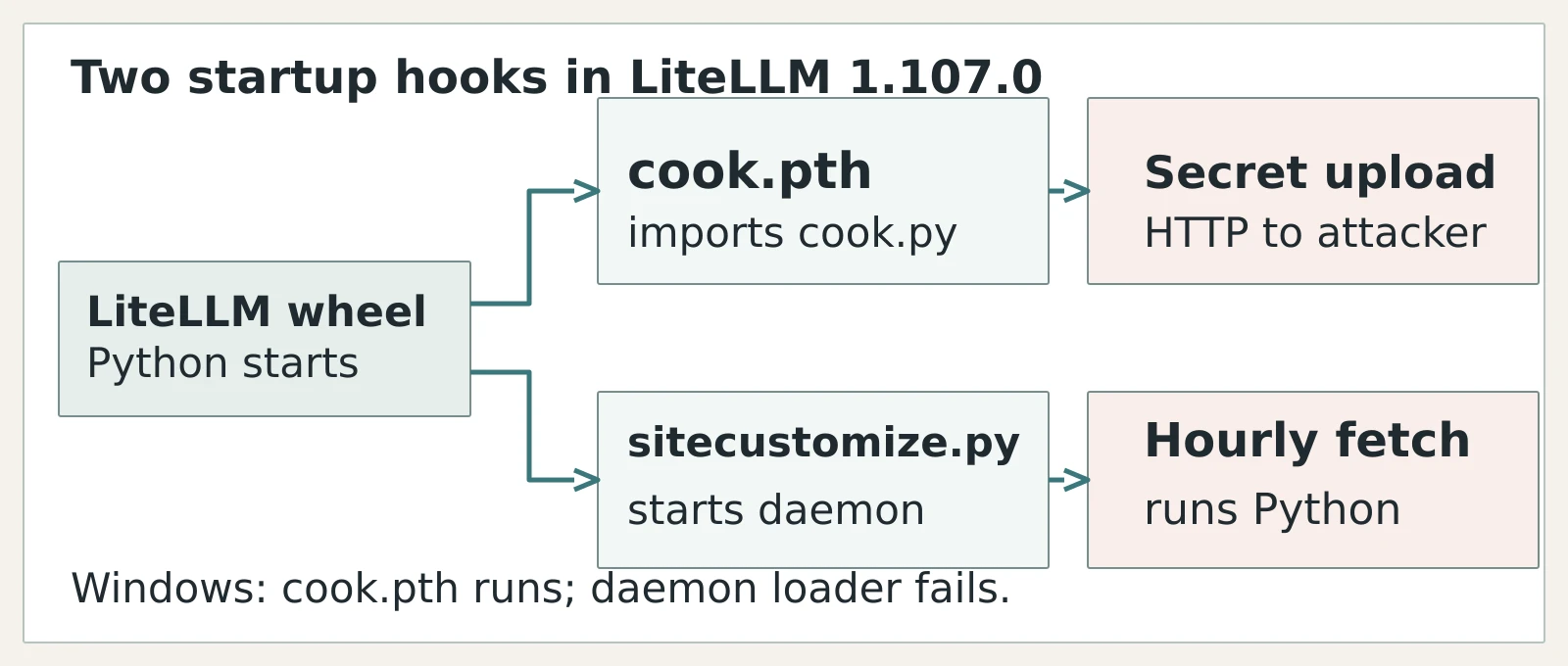
Figure details
A LiteLLM 1.107.0 wheel leads to a Python interpreter start. The upper branch is cook.pth importing cook.py and posting collected secrets to an attacker host over HTTP. The lower branch is sitecustomize.py starting a daemon that fetches and runs remote Python each hour. A note states that on Windows cook.pth runs but the daemon loader fails.
Locate the Pulled Artifact
Check dependency locks, CI install records and the installed LiteLLM version for 1.107.0, including environments created from open-ended constraints. Match proxy deployments to their pulled image digest, not today’s tag target. StepSecurity identified v1.107.0 across ghcr.io/berriai/litellm, ghcr.io/berriai/litellm-database, ghcr.io/berriai/litellm-non_root and docker.io/litellm/litellm. The floating latest, main-latest and main-stable tags pointed at the infected build from about 11:48 UTC until the images were removed that afternoon.
Inspect affected site-packages directories for cook.pth, cook.py and an unexpected sitecustomize.py; the image’s reported path is /app/.venv/lib/python3.13/site-packages/. Inspect historical DNS, proxy or firewall records for litellm[.]dev and www[.]litellm[.]dev, and investigate a process holding /tmp/remote_code_loader.lock. A request ending in /codepy to a dead-drop-selected host indicates the second-stage code path ran. Preserve relevant host and network evidence before removing the environment. Inspect from a clean environment or mounted filesystem: invoking the affected Python interpreter restarts its hooks.
StepSecurity found the 1.107.0 release candidates and inspected 1.106.x wheels clean. Its analysis distinguishes these from the final 1.107.0 wheels; check the installed bytes and actual image digest before deciding which hosts require incident response. The researcher also lists separate litellm-proxy-extras and litellm-enterprise releases reported clean in the original disclosure.
Rebuild Hosts and Rotate Keys
For a host that ran an affected wheel or image, isolate it and stop the detached loader, then rebuild the Python environment or redeploy a clean image pinned by digest. StepSecurity recommends litellm==1.106.2 or the v1.106.2 image by digest. Remove cached 1.107.0 wheels and images from internal registries so the next build cannot restore them. Verify the new environment’s installed version and the absence of cook.pth, cook.py and the unexpected sitecustomize.py before restarting workloads.
Rotate credentials the affected host could read, especially cloud and CI secrets, SSH and GPG keys, browser sessions, developer-tool tokens, and LiteLLM proxy provider API keys. On database-backed proxies, include the master and salt keys and the provider secrets in LiteLLM_CredentialsTable and LiteLLM_ProxyModelTable. Examine egress during the exposure window and scope any /codepy traffic as possible additional code execution. A clean rebuild ends the startup path; credential rotation addresses what the earlier process could have sent out.